NYC Live Map: how I built a real-time map of New York City from open data and a local AI
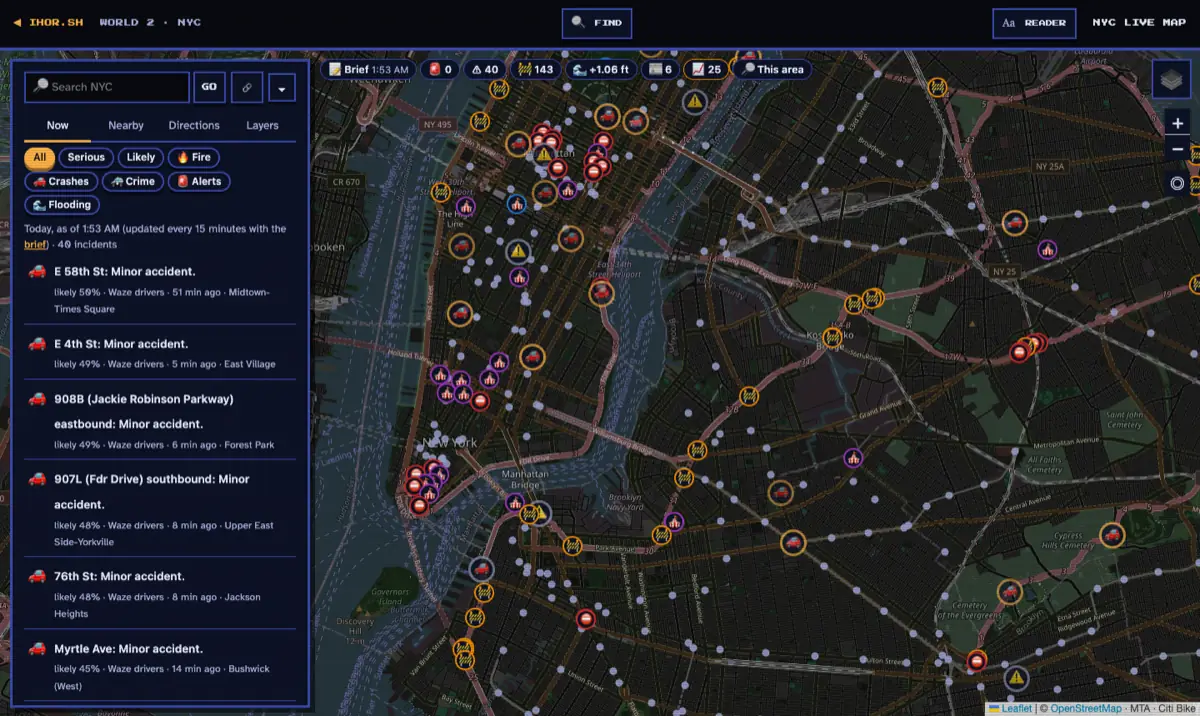
A helicopter circles over your block, sirens come and go, the street is closed off, and you do what everyone in New York does: open a map app. It shows you traffic, restaurants and how long it takes to walk to the subway. It doesn't tell you what's going on.
The information exists. New York City publishes an enormous amount of live data: emergency alerts, road incidents, street flooding sensors, 311 complaints, film permits, fire dispatches, traffic cameras. Local newsrooms cover the rest within the hour. But it's spread across dozens of agency websites, feeds and apps, each with its own format and its own idea of what "now" means.
So I built one map that puts it together: the NYC Live Map on ihor.sh. It's free, needs no account, and is live today. This is the story of how it came together, what's inside it, and what I learned along the way.
The problem: New York's information is everywhere and nowhere
If you want to know what's happening on your block right now, you have to visit a lot of places:
- Emergencies come from Notify NYC, the city's alert service, and the National Weather Service.
- Road incidents and closures come from 511NY, the state's traffic system, which also carries drivers' Waze reports.
- Flooding comes from FloodNet, a network of street sensors, and NOAA's tide gauge at the Battery.
- Quality-of-life problems show up in 311 requests, about a day and a half later.
- Film shoots and street fairs that take your parking live in permit databases.
- The story behind the sirens is in local news, on fifteen different websites.
Even when you find it all, three problems remain. The same crash can show up ten times (one report per driver, plus 511NY, plus two news outlets). You can't tell a solid report from a guess. And you can't tell whether something is unusual for that place or just how that corner always is.
The NYC Live Map is my answer to all three: collect everything in one place, merge reports of the same thing, say how likely each one is to be real, and compare it with what's normal there.
What the map does
- Today's incidents from the city's feeds, merged and ranked, each with how likely it is to be real and which sources agree.
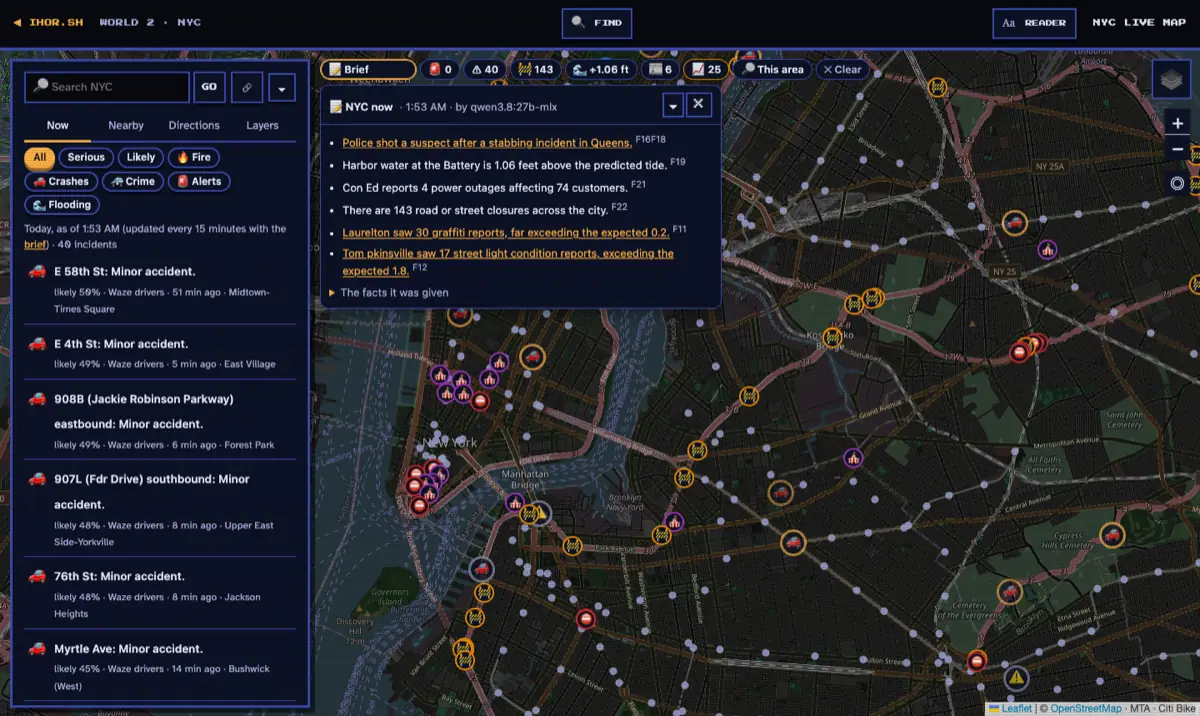
- A city bar across the top: active alerts, incidents, closures, street flooding and the harbor's water level, today's local news, and air quality or power outages when they matter. Each chip opens its list and puts it on the map.
- AI briefs of the whole city every 15 minutes, and of any area on request, where every sentence has to cite the facts it came from.
- 🔎 This area: everything in the part of the map you're looking at. What's on now, the last 24 hours hour by hour, 311's week against its usual, local news, cameras and the official public-safety record.
- 1,248 cameras: 855 NYC DOT traffic cameras, 361 live video streams from New York State, 25 webcams and 7 round-the-clock YouTube streams of the skyline. An AI can look at them for you.
- Getting around: live subway trains (one line at a time if you like), bus arrivals, NYC Ferry, Citi Bike, broken elevators, and a trip planner for driving, biking, walking or transit.
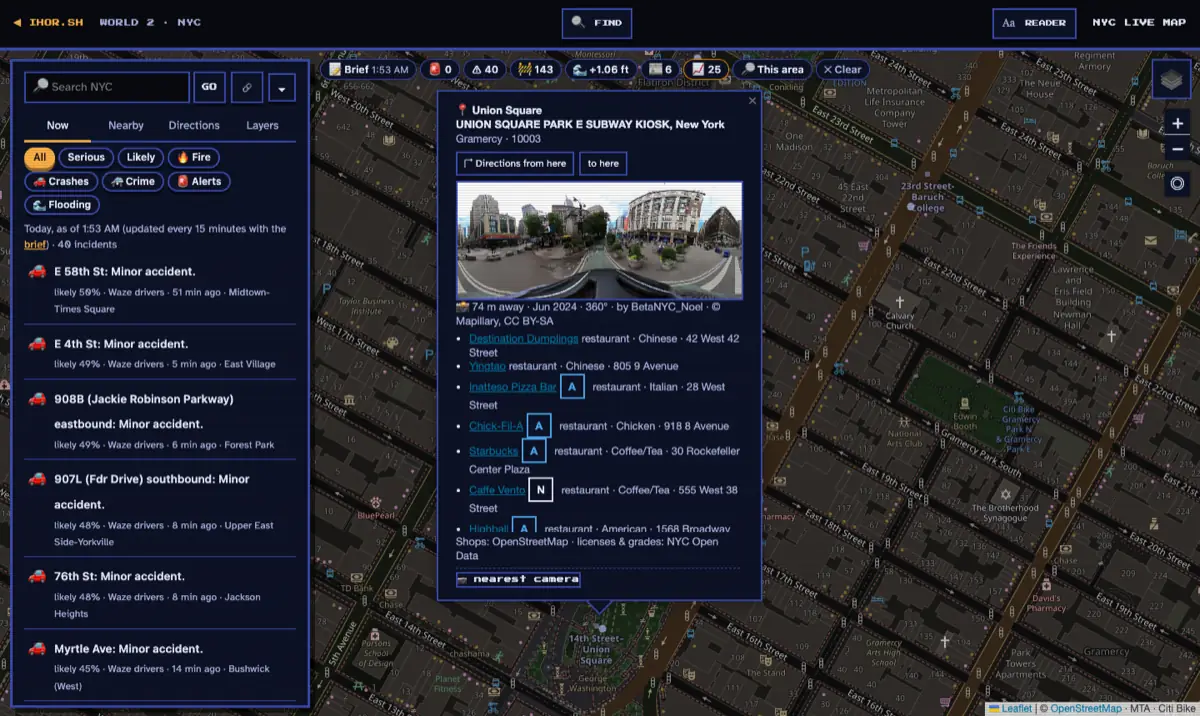
- Every place has a street photo: open an incident, a closure or a station, or double-click (long-press on a phone) any spot, and you see what it looks like from the sidewalk, plus directions there and the nearest camera.
- The sky and the harbor: rain radar, lightning, aircraft and helicopters, ships, hurricanes and the ISS.
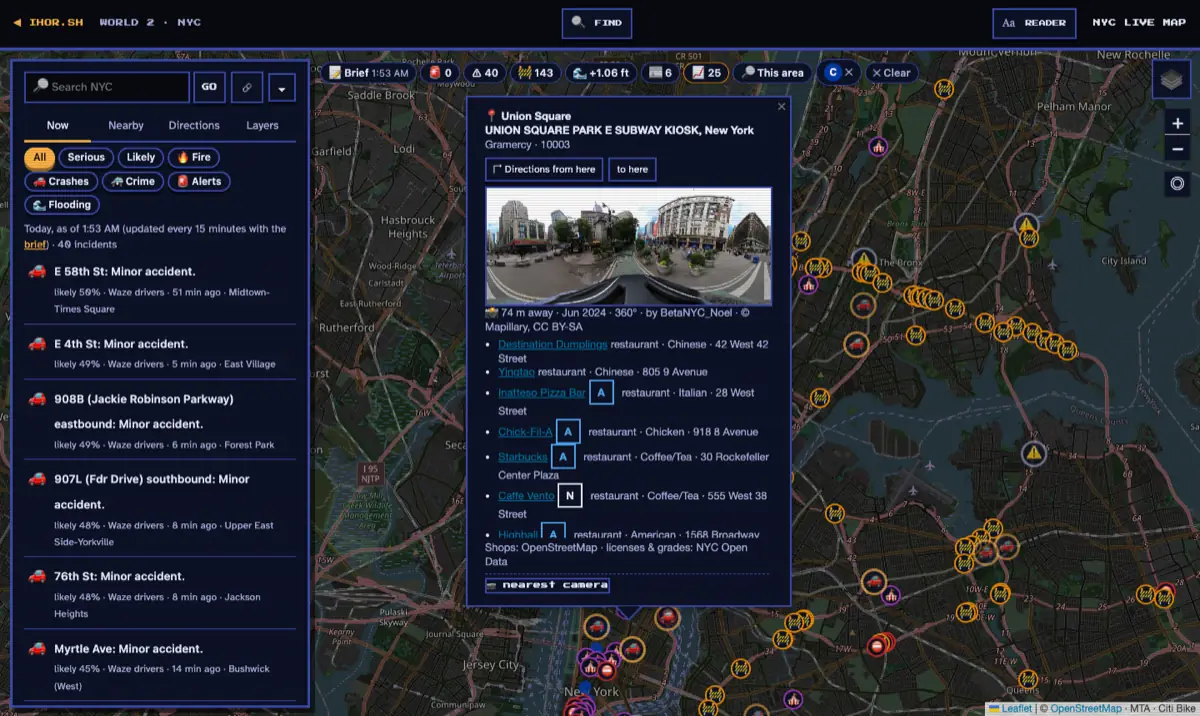
- Blip, the site's assistant, can answer "what's going on around Times Square?" and drive the map for you: "show the C trains" filters the map to the C line (27 trains were running on it when I tested).
How it came together
It started small. On October 8 it was a single page called "Subway Bailout": the MTA's subway alerts on a map, and when your station had a problem, the nearest Citi Bike docks that still had bikes. Then it grew in two bursts, about two weeks apart. I built it with AI coding agents, Claude Code and Gemini, doing most of the typing while I decided what to build and checked the results.
| When | What shipped |
|---|---|
| October 8 | "Subway Bailout": live subway alerts and the nearest Citi Bikes with bikes |
| October 9 | The NYC Live Map: traffic cameras in movable windows, elevator outages, events, restaurant inspections, what's at any address, a trip planner, live trains, ferry boats, Citi Bike, traffic speeds, the sky layers (radar, lightning, clouds, aircraft) and street photos |
| October 10–11 | Everything within 400 m of you when the map opens, the ISS and its passes, a search box, a street-photo viewer, and AI upscaling of camera frames |
| October 23 | Live video cameras, and the big one: the city's live feeds in one store, local news, today's incidents with how likely each is real, unusual 311 counts, AI that looks at cameras, and briefs every 15 minutes |
| October 23–24 | A page that explains it all, Blip driving the map, emoji map pins you can tell apart, and a round of polish on every popup |
By the end the map page alone had gone through 87 commits. The idea that changed the project was simple: stop treating the feeds as separate layers, and start treating them as witnesses to the same city.
Where the data comes from
All of it is public. Some feeds need a free key, and those keys stay on the server.
| Source | What it tells us | How often |
|---|---|---|
| Notify NYC | Emergency alerts: fires, water main breaks, gas work, closures | every 2 minutes |
| 511NY | Road incidents, closures, construction, special events, Waze drivers' reports | every 2 minutes |
| National Weather Service | Watches and warnings for the five boroughs | every 5 minutes |
| NOAA tide gauge at the Battery | Harbor water against the predicted tide | every 6 minutes |
| FloodNet | Street flooding from 437 sensors, compared with each sensor's usual readings | every 10 minutes |
| Open-Meteo | Air quality and rain | every 10 minutes |
| Con Edison | Power outages | every 15 minutes |
| 15 NYC newsrooms | Today's local stories (headline, summary and link only) | every 15 minutes |
| NYC Open Data | 311 requests, permitted street events, film shoots, FDNY fire dispatches, NYPD crash records, neighborhood maps | hourly to daily |
| adsb.lol | Aircraft, including helicopters circling low | every 30 seconds |
| Cameras | NYC DOT, NYSDOT, YouTube and Windy | streams checked regularly, dead ones dropped |
| MTA, NYC Ferry, Citi Bike | Trains, buses, boats and bikes | when someone looks |
| MTA alerts and elevator outages | Every alert and outage, kept as a history the MTA doesn't publish | every 5 minutes |
| Mapillary, OpenStreetMap, NYC Geoclient | Street photos, businesses, addresses | when someone looks |
The store already holds nearly 350,000 311 requests from the last five weeks and 2,895 FDNY fire dispatches. On its first day, the map read 248 local news stories.
How the pipeline works
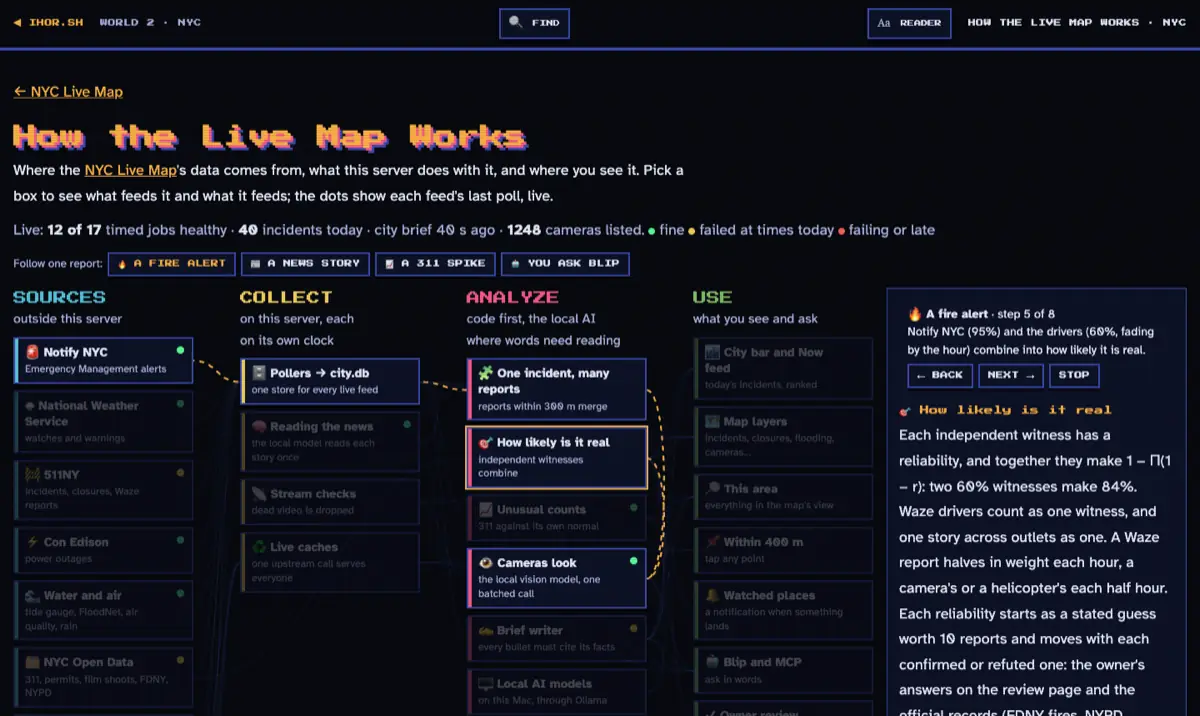
The whole pipeline is drawn as an interactive diagram at How the Live Map Works, with each feed's health shown live. It has four steps.
1. Collect: one store, every feed on its own clock
Each feed has its own timer, from every 30 seconds to once a day, staggered so a restart doesn't hit them all at once. Every report goes into one database and gets its borough and neighborhood. When a feed stops listing something, the map treats it as over. Every poll is logged with how it went, which is what the diagram's green, yellow and red dots show.
Feeds that only matter when you're looking, like trains, ships and bikes, aren't polled. They're fetched on demand and cached, so one request to the MTA serves everyone looking at the map in the same 30 seconds.
2. Merge: one incident, many reports
Reports of the same kind of thing within 300 meters of each other become one incident. A news story the AI could only place at a neighborhood joins an incident of the same kind (a fire, a crash, a flood) within 1.5 km. Closures and planned work stay separate, because a crash next to a construction zone is still a crash.
The map shows only today's incidents, rebuilt every 15 minutes. A Waze report counts for 3 hours, because a crash from this morning shouldn't still be on the map tonight.
3. Trust: how likely is it real?
This is the part I'm proudest of. Each source is a witness with a reliability: Notify NYC starts at 95%, 511NY at 90%, a news story at 75% and Waze drivers at 60%. Independent witnesses combine, so two 60% witnesses together make 84%, and an alert backed by drivers is close to certain.
Two rules keep it honest. Ten drivers reporting the same crash count as one witness, not ten, and so does one story carried by five outlets. And reports fade: a driver's report loses half its weight every hour.
Those starting reliabilities are my guesses, so the map checks them against reality. Weeks later, when FDNY's dispatch file and NYPD's crash records are published, each report is marked confirmed or refuted (and I can answer "real or not?" myself on a review page), and the source's reliability moves. Waze started at my guess of 60%. After its first 13 reports were checked against NYPD's records, it's at 52%.
4. Context: is this unusual here?
Twelve noise complaints mean nothing in one ZIP code and a lot in another. So for each kind of 311 request in each ZIP code, the map works out what's expected: that area's rate over the last four weeks, adjusted for the season (heat complaints in October aren't the same as heat complaints in January). Then it asks how likely the count is to be chance. Because it asks that for every kind of request in every ZIP code, it uses a standard statistical correction that keeps false alarms to about 5% of what it flags. A flag also needs at least 5 requests, at least twice the usual, from at least 3 different places, so one angry neighbor can't trigger it.
A real example from the brief at 1:53 AM on October 24: Laurelton, in Queens, had 30 graffiti reports when about 0.2 were expected, and Tompkinsville, on Staten Island, had 17 broken street light reports against 1.8.
Where the AI comes in
A lot of this is plain code. The AI does the parts that need reading or seeing, and it runs on one Mac at home: a 27-billion-parameter Qwen model through Ollama. The news reading, the camera checks and the briefs never leave that machine.
- Reading the news. The model reads each new headline and summary once and answers fixed questions: is it in New York, did it happen today, is it an incident, how serious is it, and where. A second model turns headlines into numbers that capture their meaning, so five outlets covering the same fire are recognized as one story.
- Looking at cameras. When a serious incident appears, the model looks at up to 3 cameras within 400 m of it and reports traffic, the road surface, visibility, emergency vehicles and smoke. What it sees becomes one more witness. It gets a budget of 12 minutes of model time an hour, so it can't crowd out visitors.
- Writing briefs. Every 15 minutes the code gathers numbered facts (incidents, alerts, unusual counts, the tide, the air, outages, news) and the model writes 3 to 6 short bullets, each listing the facts it used. A bullet survives only if every fact it cites exists and every number in it appears in those facts. If nothing survives, the brief is simply the facts.
Who it's for
- Commuters, before leaving: incidents on the way, one subway line's trains, the next bus, a Citi Bike nearby.
- Anyone who hears sirens or a helicopter: tap the spot to see everything within 400 m, or open 🔎 This area.
- People on storm days: which street sensors show water now, how high the harbor is above the predicted tide, rain radar and weather warnings in one view.
- Drivers looking for parking: film shoots holding curb space, street fairs, construction closures.
- Residents tracking their neighborhood: 311's week against its usual. A spike in heat complaints or noise shows up as unusual, not just as a big number.
- Local reporters and the curious: one story across outlets, the cameras nearby, and the official NYPD and FDNY record for the area.
- Visitors: free events, public restrooms, restaurant grades, and a street photo of where you're going.
- AI agents: the same tools Blip uses are open to other agents over MCP, including one that looks at an area's cameras and describes what's there.
Why not just use Google Maps?
I use Google Maps every day, and this isn't a replacement for it. A navigation app answers "how do I get there?" better than anything I could build. The NYC Live Map answers a different question: "what's going on here, and should I care?"
| Use a navigation app (Google Maps, Apple Maps, Waze) for | Use the NYC Live Map for |
|---|---|
| Turn-by-turn directions and arrival times | What's happening around a place right now, from the city's own feeds |
| Finding and reviewing businesses | Official alerts, flooding sensors, film shoots and permitted events on one map |
| Traffic along your route | How likely a report is to be real, and which independent sources agree |
| Street View | Whether a number is unusual for that place, adjusted for the season |
| Local news placed where it happened, and the same story grouped across outlets | |
| 1,248 cameras you can open, with an AI that can look for you | |
| A brief that shows its sources, so you can check it |
It's also open about itself. The map has a page that shows where every number comes from and whether each feed is working, and it says plainly what it can't see.
What it can't see
- No live 911 or police calls. NYC publishes 911 response data only as weekly citywide totals, and NYPD's call and complaint records with locations run months behind. The map shows them as the official record, not as what's happening now.
- FDNY's dispatch file runs weeks behind. It's used to check fire reports after the fact.
- News is placed by an AI. A story placed only at its neighborhood is drawn as a dashed circle.
- 311 is about a day and a half behind, so "unusual" means yesterday's counts, not this hour's.
What I learned
- The hard part isn't getting data. It's knowing when two reports are the same thing. Merging, grouping stories and counting witnesses took more thought than any feed.
- Trust has to be measured, not assumed. My 60% guess for Waze was too generous. The map found that out by itself, once it had official records to check against.
- Make the AI show its work. A brief whose every sentence cites its facts can be checked. A brief that can't cite them falls back to the facts themselves.
- Never let AI fill a gap. An early version of the camera check fell back to "moderate traffic, clear, dry" when the model failed, which looked exactly like a real reading. Now a failure says it failed.
- One local model is a shared resource. Visitors' questions go first and background work waits for idle time. Looking at five cameras in one call (14 to 47 seconds in my tests) beats five separate calls.
- "Now" needs a clock. Only today's incidents, Waze reports for 3 hours, and everything refreshed every 15 minutes. A live map full of stale reports is worse than no map.
- Official data is late, so say so. Telling people what the map can't see makes them trust what it can.
- Show the health of every feed. The free aircraft feed fails about a quarter of its polls (321 of 1,301 in one day). The status dots make that visible instead of mysterious.
- Seasons fool simple baselines. Comparing a week with the four before it flags every change of season: heat complaints climb every October when the heating season starts. Adjusting for the season fixed it.
- An assistant is only as good as the tools it can see. For a while Blip saw only the map's first 12 actions, so "show C trains" got a link instead of the C trains. Once it could see all of them, it simply did it.
- Small details decide whether people trust it. A popup whose close button slides under the toolbar, or a street photo that never loads, makes the whole map feel broken, however good the data is.
What's next
Next on the list: traffic speeds kept over time so slowdowns stand out, outage locations from Con Edison, travel times for the bridges and tunnels, cameras that notice when a scene changes, and a time slider to replay a day.
FAQ
Is the NYC Live Map free? Yes. It's at ihor.sh/nyc, with no account and no ads.
How often is it updated? Each feed has its own schedule, from every 30 seconds (aircraft) to every few hours (FDNY's records). Today's incidents and the city brief are rebuilt every 15 minutes.
Where does the data come from? From public sources: NYC Open Data, Notify NYC, 511NY, the National Weather Service, NOAA, FloodNet, the MTA, NYC Ferry, Citi Bike, Mapillary, OpenStreetMap and 15 local newsrooms. The How the Live Map Works page lists them all, with each feed's health.
Which AI does it use? A Qwen model running on a Mac at home, for reading the news, looking at cameras and writing briefs. Blip, the chat assistant, uses a cloud model and falls back to the local one.
Does it need my location? No. When the map opens, your browser asks whether to share it, so the map can show you and what's within 400 m. Say no and everything else still works. Places you watch are saved in your browser, not on the server.
Is the code open? Yes. The whole site, map included, is in the ihor.sh repository on GitHub.
Open the NYC Live Map, double-click any spot in the city, and see what's going on there.